TOP 5 Heat Sinks TOP 5 Low Profile Heat Sinks TOP 5 Liquid Coolers
Heatsinks by Brand / Mfgr Reviews + Articless Advanced Search
|
TOP 5 Heat Sinks TOP 5 Low Profile Heat Sinks TOP 5 Liquid Coolers Heatsinks by Brand / Mfgr Reviews + Articless Advanced Search |
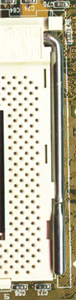
30 sec Slocket Tweaks Get ready for the quick and dirty on tweaking a CuMine compatible slocket so it will work perfectly with just about any old-style heatsink. As we all know Coppermines sit pretty low in the socket. With a fair-sized heatsink strapped onto the cpu, the heatsink usually comes in contact with the socket's lever, causing it to sit slightly askew. That messes things up really bad and if the heatsink isn't flush to the silicon, it isn't doing all it can to keep the core cool. Of course we have a couple of ideas on how to fix that little problem. The next little quirk to surface with the FC-PGA CopperMine platform revolves around die size. Compared the Celeron's slug (25x25mm) the CuMine's bare silcon die measures only 11x9mm. That translates into smaller surface area and increased importance for themal transfer.That's nothing new though, so let's get on with the solution. A problem many of us have experienced when using a heatsink originally designed for a Celeron on a PIII is that the heat sink won't sit flat - it just tilts mockingly to one side. Typically this is due to the way the heatsinks' clip has been formed. Well, today is the day to wipe the smirk clear from that old heatsink and put it to good use! Part A: The Slocket Armature Tweak:
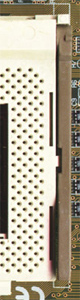
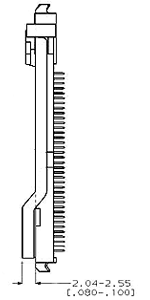
First off lets just consider what options the Slocket card manufacturers give us. Slocket A) is an Asus type with a socket-370 by AMP; Slocket B) is an OEM type with an genaric OEM socket-370. The plastic cam lever is the easiest to modify for CuMine usage - melt, cut, or otherwise remove the raised part and that's it. Socket A) has the more common metal lever and is relativly more difficult to tweak but still quite easy. The only tools needed are a vice and bastard-cut (medium) or second-cut (fine) hand file
|
 |
|
| |||||||||||||||||||||||||||||
|
Find a Heatsink . Latest Heatsink Reviews . Top 5 Heatsinks Tested . Top 5 Low Profile Heatsinks . Top 5 Liquid Coolers . Heatsinks by Mfgr / Brand |
Social Media |
FrostyTech.com Info . Feedback . Contact Us / Heatsink Submissions . Submit News . Privacy Policy |
 | |
© Copyright 1999-2023 www.frostytech.com All Rights Reserved. Privacy policy and Terms of Use Images © FrostyTech.com and may not be reproduced without express written permission. Current students and faculty of accredited Universities may use Frostytech images in research papers and thesis, provided each image is attributed. | ||||